

What Is JSON and Why Valid JSON Matters for SEO
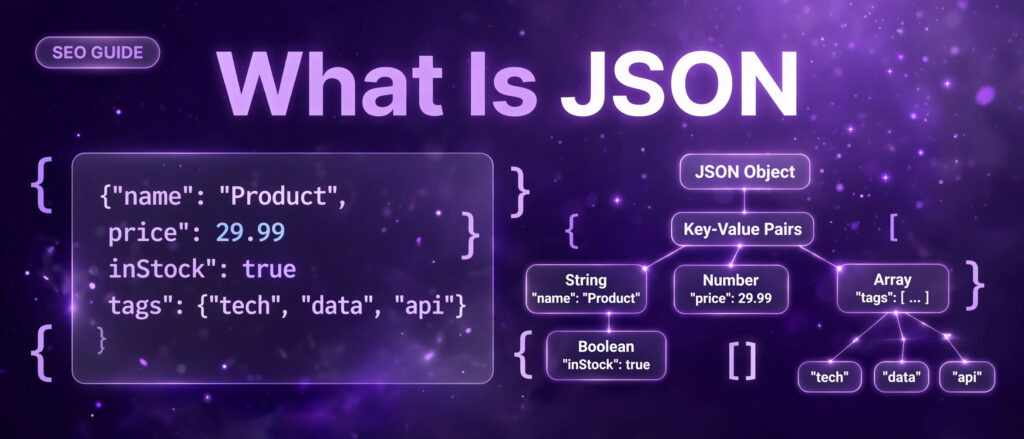
What is JSON? It is the quiet format that carries almost everything you read on the web. Every time a page loads prices, a search result shows review stars, or an app pulls fresh data from a server, there is a good chance JSON is doing the carrying. The letters stand for JavaScript Object Notation, and the format is a lightweight text based way to store and exchange structured data. It looks like a short list of labelled values inside curly braces, and both people and machines can read it without special software.
This guide explains what JSON is, how it works, where it shows up in everyday SEO work, and why a single misplaced comma can break the structured data that powers rich results. You will also learn how to check your own JSON in seconds with the free JSON Formatter and Validator on LinkTrixx, a browser only tool that formats, validates and minifies JSON with no signup and no upload. If you work with schema markup, sitemaps, APIs or configuration files, this guide gives you the grounding to handle JSON with confidence.
What is JSON, in plain words
JSON is a text format for writing structured data so that two systems can exchange it. Think of it as a packing list. Each item on the list has a label and a value, and the labels tell the reader exactly what each value means. A JSON document about a product might say its name is a wireless mouse, its price is 29.99, and it is in stock. Nothing in the document explains how to display those facts. It only records them, clearly and consistently, so that any program can read them and decide what to do next.
The format is built on two structures that most programming languages already use. The first is an object, a collection of name and value pairs inside curly braces. The second is an array, an ordered list of values inside square brackets. Everything in JSON is made from those two structures plus six value types, which the next sections explain one by one. That small set of rules is the whole language, and it is the reason JSON spread so fast. A developer can learn the full grammar in an afternoon, and a parser for it can be written in any language with little effort.
JSON is also language independent. It borrowed its syntax from JavaScript, which is why JavaScript is in the name, but it belongs to no single language. Python, PHP, Ruby, Go, Java, C#, Swift and Rust all read and write JSON natively, and every major web API speaks it. The MDN documentation on JSON puts it simply: JSON is a syntax for serializing objects, arrays, numbers, strings, booleans and null, based on JavaScript syntax but distinct from JavaScript. That distinction matters, because JSON is stricter than JavaScript, and the places where the two differ are exactly where most JSON errors come from.
Here is the smallest useful example, a JSON object describing one product:
{
  "name": "Wireless Mouse",
  "price": 29.99,
  "inStock": true,
  "tags": ["office", "wireless", "accessories"]
}
Read it line by line and the shape becomes clear. The opening brace starts an object. Each line inside it is a name in double quotes, then a colon, then a value. The name is a string, the price is a number, inStock is a boolean, and tags is an array of three strings. Commas separate the pairs, and the closing brace ends the object. There is no extra decoration, no closing tags, and no hidden meaning. What you see is what the data is.
A short history of JSON
JSON was specified by Douglas Crockford in the early 2000s, drawing on the object literal syntax of JavaScript. He and Chip Morningstar sent the first JSON message in April 2001, and Crockford published the format at json.org in 2002. The idea was deliberately minimal. Earlier data formats carried schemas, namespaces and type systems with them. JSON left all of that out and kept only the shapes that every language already had: objects, arrays and a handful of simple values. That minimalism is what let every language adopt it quickly and consistently.
The format moved from a personal project to a formal standard in stages. It was first described in RFC 4627 in 2006, then revised as RFC 7159 in 2013, and the current version is RFC 8259, published in 2017 as Internet Standard STD 90. The same grammar also appears as ECMA 404 and as the international standard ISO/IEC 21778:2017. The Wikipedia entry on JSON records that timeline, and the JSON Neat beginner guide explains how the removal of namespaces, schemas and type tags is what made the format portable enough to become the default for web data.
By the time the standard settled, JSON had already replaced XML as the default format for web APIs. XML is still the right choice for documents and for standards that require it, and sitemaps are still written in XML, but for moving records between systems JSON won on size, readability and ease of parsing. The guide to what an XML sitemap is explains why that one file stayed in XML while almost everything around it moved to JSON.
The six building blocks of JSON
JSON has exactly six value types. Every JSON document, however large, is built from them. There are no dates, no functions, no undefined values and no comments. If you know these six types and the two structures that hold them, you can read any JSON file you meet.
1. Strings
A string is text inside double quotes. It can hold a word, a sentence, a URL or an empty value, and it must use double quotes, never single quotes. Single quoted text is valid in JavaScript and Python, but it is not valid JSON, and it is one of the most common errors people make when they write JSON by hand.
"Wireless Mouse"
"https://linktrixx.com/tools/json-formatter-validator/"
""
Inside a string, a double quote must be escaped with a backslash, as in “She said \”hello\””. A real line break inside a string is also an error. It must be written as \n, the escape sequence for a new line. These small rules are the price of a format that every parser in every language can read the same way.
2. Numbers
A number in JSON is written plainly, with no quotes around it. It can be a whole number, a decimal or a number in exponent form, and it can be negative. Leading zeros are not allowed, so 07 is invalid, and the values NaN and Infinity are not allowed either. Quoting a number turns it into a string, which changes its meaning completely: 29.99 is a number a program can add and compare, while “29.99” is text that happens to look like a number.
29.99
42
-3.14
1e10
3. Booleans
A boolean is either true or false, written in lowercase with no quotes. Booleans record yes or no facts: whether a product is in stock, whether a page is published, whether a feature is switched on. Writing True with a capital T, as Python does, or “true” in quotes, produces an error or a string instead of a boolean, and both mistakes appear often when JSON is copied out of another language.
true
false
4. Null
Null means no value. It is written in lowercase with no quotes, and it is different from an empty string, from zero and from false. A field set to null says the value is deliberately absent, which is useful when a piece of data does not apply. A product with no discount might carry “discount”: null, which tells the reader the discount was considered and found to be nothing, rather than forgotten.
null5. Objects
An object is a collection of name and value pairs inside curly braces. The names, also called keys, must be double quoted strings. The values can be any of the six types, including another object or an array, which is how JSON builds nested structures. Objects are unordered by the specification, so a parser is free to read the pairs in any order, and well written JSON never depends on the order of keys.
{
  "title": "What Is JSON",
  "published": true,
  "wordCount": 4800
}
6. Arrays
An array is an ordered list of values inside square brackets, separated by commas. Unlike an object, an array keeps its order, and the values in it can mix types, though in practice a well designed array holds values of one kind. Arrays are how JSON represents lists: tags on a product, questions in a FAQ block, URLs in a sitemap feed, or steps in a process.
["office", "wireless", "accessories"]
[29.99, 19.99, 9.99]
[]
An empty object {} and an empty array [] are both valid JSON. So is a bare value on its own: 42, “hello”, true and null are each complete, valid JSON documents under RFC 8259, even though most real files start with an object or an array. The JSON syntax reference sets out the full grammar in a few short rules, and it is worth reading once, because the whole language fits on a single page.
How to read a JSON object, line by line
The best way to learn JSON is to read one real object slowly. The example below describes a blog article, and every line in it uses one of the six types you have just met. Work through it once and you will be able to read most JSON files at a glance.
{
  "title": "What Is JSON and Why Valid JSON Matters for SEO",
  "author": "LinkTrixx",
  "published": true,
  "wordCount": 4800,
  "rating": 4.9,
  "topics": ["JSON", "SEO", "structured data"],
  "editor": {
    "name": "Salman Mirza",
    "role": "Founder"
  },
  "summary": null
}
The opening brace starts the object, and the closing brace at the end closes it. Inside, there are eight pairs. Title and author are strings. Published is a boolean. WordCount is a whole number and rating is a decimal. Topics is an array of three strings. Editor is a nested object with its own two string pairs, which shows how JSON builds depth: an object inside an object, with no limit on how far the nesting goes. Summary is null, which says the summary has not been written yet rather than leaving the field out entirely. Every pair except the last ends with a comma, and that comma rule is the single most broken rule in JSON. Put a comma after the last pair and the whole document fails.
Indentation is cosmetic. A parser ignores spaces, tabs and line breaks between tokens, so the same object written on one line means exactly the same thing. People format JSON with two space indentation because it is easy to scan, and machines minify it to one line because it is smaller to send. The meaning never changes. That is why a formatter tool can reflow JSON freely without touching the data, and why the LinkTrixx tool offers Format and Minify as two views of the same document.
JSON vs XML: how the two formats differ
JSON and XML both move structured data between systems, but they come from different places and they solve the problem in different ways. XML grew out of document markup in the late 1990s. It describes marked up text with paired tags, attributes and namespaces, and it was designed first for documents and only later adapted for data. JSON came out of JavaScript a few years later, to serialize plain data objects. That difference in origin explains most of the practical differences, as the JSON Lint comparison of JSON and XML sets out in detail.
| Feature | JSON | XML |
|---|---|---|
| Primary model | Objects, arrays and simple values | Tree of elements with attributes and text |
| Data types | String, number, boolean, null | Text only, types come from a schema |
| Size for the same data | Smaller, no closing tags | Larger, every tag name repeats |
| Arrays | Built in, ordered lists | Repeated elements, no array type |
| Comments | Not allowed | Allowed with comment tags |
| Namespaces | None built in | Built in namespace support |
| Mixed text and markup | Awkward to model | Native strength |
| Validation | JSON Schema | XSD or DTD schemas |
| Typical use | Web APIs, app data, config files | Documents, feeds, office files, enterprise standards |
The same record written both ways shows the size difference at once. Here is a product in JSON, then the same product in XML:
{
  "name": "Wireless Mouse",
  "price": 29.99,
  "inStock": true
}
<product>
<name>Wireless Mouse</name>
<price>29.99</price>
<inStock>true</inStock>
</product>JSON carries the same facts in fewer characters, because it does not repeat each tag name to close it. It also carries real types: 29.99 is a number and true is a boolean, while in XML everything is text until a schema says otherwise. The ConversionTools guide to JSON vs XML makes the same point, and adds the useful rule of thumb that if you would call your payload a record or a list of records, use JSON, and if you would call it a document, use XML.
When to use JSON
Use JSON when you are building or calling a web API, when the data goes to a web or mobile app, when you need a config file people can read and edit, or when you are working in JavaScript, where JSON maps straight onto objects. JSON is the default for REST APIs and the response format for GraphQL, and most new projects choose it because it is compact, readable and fast to parse. If the job already speaks JSON, which most web jobs now do, there is no reason to translate it into anything else.
When to use XML
Use XML when a standard requires it, when the data is really a document, or when you need namespaces, attributes or strict schema validation. SOAP web services, RSS and Atom feeds, sitemaps, SVG images and many e invoicing, banking and tax formats are XML by definition. Word and Excel files are XML too: a docx or xlsx file is a zip archive of XML files. Neither format is obsolete, and treating the choice as a contest is the mistake. The right format is the one the job already speaks, or the one that fits the shape of the data.
Where JSON shows up every day
Most people meet JSON far more often than they realise, because it works behind the scenes. Five places cover nearly all of it, and the SEO work in this guide touches at least three of them.
Web APIs
An API is how one system asks another for data, and JSON is the language of that exchange. When an app shows live prices, search results or weather, it usually sends a request to a server and receives a JSON response. The app then reads the JSON and draws the page from it. Because JSON maps directly onto the data structures of most languages, the app can parse the response in one call, with no translation layer. That is the main reason JSON displaced XML for APIs, and it is why API documentation almost always shows request and response bodies in JSON.
Configuration files
Many tools store their settings in JSON files. The best known example is package.json, the file that describes a JavaScript project: its name, its version, its dependencies and its scripts. Editor settings, build tools, linters and deployment configs use the same pattern. JSON suits config files because people can read and edit them by hand, and programs can parse them without ambiguity. The trade off is that JSON has no comments, so config files that need long explanations usually live in a different format, or keep their notes outside the file.
Structured data on web pages
This is the use that matters most for SEO, and it gets its own section below. Search engines read structured data written in JSON-LD, a flavour of JSON designed for linked data, to understand what a page is about. Product prices, review stars, event dates, article authors and FAQ questions are all carried to Google in JSON-LD blocks. If that JSON is invalid, Google ignores the whole block, which is why validating schema before publishing is a routine part of technical SEO.
Data exchange between systems
When two systems need to share records, JSON is the usual carrier. A shop sends order data to a warehouse system in JSON. A CRM exports contacts as JSON. A form on a website sends its fields to a server as a JSON body. The format works here because it is text, so it travels over any connection, and because it is typed, so the receiving system knows which values are numbers and which are strings without guessing.
Storing app state and logs
Apps save their working state as JSON, and many logging systems write each log event as one JSON object per line. That pattern, one object per line, is popular because each line parses on its own, so a broken line does not spoil the rest of the file. Databases that store documents, such as MongoDB, also use a JSON like format for their records, which means the same data can move from database to API to browser without changing shape.
One place JSON does not show up is the sitemap. A sitemap is an XML file, because the sitemap protocol was written in XML and every search engine expects it that way. Our guide on what an XML sitemap is walks through the file tag by tag, and it is a good companion to this guide, because together the two formats cover the structured data a site sends to search engines: JSON-LD for what pages mean, and XML for which pages exist.
JSON-LD and structured data: the SEO connection
JSON-LD stands for JavaScript Object Notation for Linked Data. It is JSON with one extra idea: a context line that says which vocabulary the names in the object belong to. That vocabulary is usually schema.org, the shared dictionary that search engines use to understand page content. A JSON-LD block is an ordinary JSON object placed inside a script tag in the page HTML, and it changes nothing visitors see. It only gives machines a labelled copy of facts the page already shows.
What JSON-LD looks like
Here is a small JSON-LD block describing a FAQ page. It is the same shape the guide to what FAQ schema is explains in full, and the same shape the free FAQ Schema Generator builds for you. Read it as JSON first, and the SEO meaning follows from the labels.
{
  "@context": "https://schema.org",
  "@type": "FAQPage",
  "mainEntity": [
    {
      "@type": "Question",
      "name": "What is JSON?",
      "acceptedAnswer": {
        "@type": "Answer",
        "text": "JSON is a lightweight text format for storing and exchanging structured data."
      }
    }
  ]
}
The context line says the vocabulary is schema.org. The type line says this page is a FAQPage. Inside mainEntity sits a list with one entry, a Question with a name and an acceptedAnswer of type Answer with a text value. That is the whole structure. A real page carries one entry per question, and the block is wrapped in a script tag with the type application/ld+json and placed in the page HTML. Visitors never see it. Search engines read it alongside the visible FAQ section, and the two must match word for word.
How Google reads structured data
Google describes structured data as a standardized format for providing information about a page and classifying the page content, and it recommends JSON-LD as the format because it is usually the easiest to implement and maintain. The Google Search Central introduction to structured data explains that Google uses the markup as explicit clues about meaning: which entity the page is about, and which properties belong to that entity. Google already works hard to understand content without markup. Structured data makes that understanding complete, current and eligible for the search features Google currently offers.
Google supports three formats for structured data, JSON-LD, Microdata and RDFa, and it recommends JSON-LD because the markup is not interleaved with the visible HTML, which makes nested data easier to express. The Visively guide to structured data for SEO adds the important distinction between eligibility, appearance and ranking: valid markup makes a page eligible for a rich result, it does not guarantee one, and it is not a ranking factor. A page can rank with no rich result, and a rich result can be withheld even when the markup is valid. That distinction is the honest frame for everything that follows.
The JSON-LD change Google made in 2026
There is also a recent technical change worth knowing. On 21 August 2026, Google Search Central announced that it had changed its JSON-LD extraction process to align more closely with established JSON standards. Google now applies only one pass of HTML unescaping, which means it will no longer keep correcting characters that have been encoded more than once. A double escaped ampersand, for example, may now stay double escaped instead of being unrolled to the intended character. The ArtForm summary of the JSON-LD update explains that this does not mean every site using JSON-LD has a problem, and it does not mean an affected site will automatically lose rankings. It does mean that JSON-LD should be generated cleanly, with no double encoding, and validated before publishing, which is exactly the workflow the tool in this guide supports.
Why valid JSON matters for SEO
For most developers, invalid JSON means a broken API call or a failed build, and the error shows up at once. For SEO, invalid JSON is quieter and more costly. A JSON-LD block with one bad comma does not break the page. The page loads, visitors see everything, and nobody notices. Google simply ignores the whole block, because a parser cannot read half a document. The structured data is gone, the rich result it might have earned is gone, and the only trace is a validation error in Search Console, if anyone looks.
One comma can erase a rich result
That is the core reason valid JSON matters for SEO. Schema markup, sitemaps and API responses are all built on structured formats, and a single misplaced comma can break a whole block of structured data. The tool page for the JSON Formatter and Validator says the same thing in plain words: a single misplaced comma can break structured data, so Google ignores it and rich results disappear. Formatting JSON makes that kind of error easy to spot, and validating it before you publish means your schema, configs and API payloads work first time.
The risk is highest with FAQ schema, because a FAQPage block is long, repetitive and hand edited more often than other types. Each question adds another nested object, another set of commas and another chance to drop a quote. The FAQ Schema Generator worked example shows the full process on a real page, using six real questions from a live article, and it stresses the same rule at every step: the schema must match the visible FAQ section word for word, and the JSON must parse before the page goes live.
The honest position on FAQ rich results in 2026
There is one fact that changes how much FAQ schema is worth, and it has to be stated plainly, because older guides still describe a search feature that no longer exists. Google stopped showing FAQ rich results for every site on 7 May 2026, according to its documentation changelog, and removed the FAQ structured data documentation from Search Central on 15 June 2026. The Seeberger guide to the FAQ rich result removal records the full timeline: FAQ rich results were limited to well known, authoritative government and health websites in August 2023, then removed entirely in May 2026, with no exception for government or health sites in the final entry.
What remains is the vocabulary, not the display feature. FAQPage is still a valid schema.org type, and Google has said that structured data it is not using does not cause problems for a site, so there is no need to strip valid FAQPage markup from pages. The LSEO guide to FAQPage in 2026 makes the same distinction: Google discontinued the FAQ rich result feature, not the FAQPage type, and a valid FAQPage block no longer makes a page eligible for a Google FAQ rich result simply because there is no such feature to become eligible for.
Google has also said, in its guide to performing in generative AI features, that no special schema.org markup is needed to appear in AI Overviews or AI Mode, and that structured data is not required for generative AI search. The TopFound guide to FAQ SEO in 2026 draws the practical conclusion: FAQ SEO now means writing a short set of real questions and direct answers on the page, in self contained passages that people and AI systems can understand and quote, because the value is in the content itself, not in the display treatment that used to sit on top of it.
None of this makes JSON validation pointless. It makes the reason for it more honest. You validate JSON-LD so that the data is clean, parseable and ready for every system that reads it, including the rich result types Google still supports, such as Product, Review, Article, Breadcrumb, Event, Recipe and Video. You do not validate it to win back a FAQ display that Google retired. The comparison of the free FAQ Schema Generator with paid SEO tools works through the same honest position in detail, including which paid tools still list FAQ schema among their features and what that promise is actually worth in November 2026.
Structured data is not a ranking factor
It is worth repeating, because it is the most common misunderstanding in technical SEO. Valid structured data does not move a page up the rankings. Google has never listed structured data as a direct ranking signal. What structured data does is make a page eligible for richer displays, such as prices, review stars or breadcrumb trails, and those displays can lift click through rates when they appear. Eligibility is not entitlement, and appearance is not ranking. A page earns its ranking from content, relevance and authority, which is where links come in. A page needs to be found before it can rank, and it needs links before it can rank well. Clean JSON handles the first half of that equation, by making sure the data Google reads is intact. Link building services handle the second half, by earning the links that give a found page the authority to compete.
The most common JSON errors and how to fix them
JSON is strict, and its strictness is the point. A parser either reads the whole document or rejects it, and the error message names the first place where the document stops making sense. The ten errors below cover nearly every failure you will meet. Each one shows the broken version, explains why the parser rejects it, and shows the fix. The UtilHQ guide to common JSON syntax errors lists the same five errors at the top of its list, trailing commas, single quotes, unquoted keys, comments and missing commas, and notes that they account for most JSON parsing failures. The Sammapix guide to common JSON errors adds the useful point that the error message wording varies between browsers and JavaScript engines, while the underlying cause is always the same.
1. Trailing commas
A comma is a separator, never a terminator. JSON forbids a comma after the last item in an object or an array, even though JavaScript, Python and most modern languages allow it. Developers who write JSON by hand, or copy a JavaScript object literal into a JSON context, carry the habit across, and the parser fails at the closing bracket because it expects another value after the comma and finds none.
{
  "name": "Wireless Mouse",
  "price": 29.99,
}
The fix is to remove the comma after the last item. In a multi line object, that is the comma on the last property line before the closing brace. The error message usually reads Unexpected token } because the parser expected a value, not a closing brace.
{
  "name": "Wireless Mouse",
  "price": 29.99
}
2. Single quotes instead of double quotes
JSON has exactly one string delimiter: the double quote. Single quotes are valid in JavaScript and Python, which is why this is the most common mistake when JSON is hand written or copied out of source code. A parser that meets a single quote reports an unexpected token, because it was looking for a double quoted property name or string value.
{
  'name': 'Wireless Mouse'
}
The fix is to replace every single quote with a double quote. If a string value itself contains a double quote, escape it with a backslash. If it contains a single quote, leave it alone: the word don’t is fine inside double quotes, because the single quote is just a character there.
{
  "name": "Wireless Mouse"
}
3. Unquoted keys
Object keys must be quoted strings in JSON, unlike JavaScript where they can be left bare when they are valid identifiers. A parser that meets an unquoted key sees the first letter and does not recognise it as the start of a valid JSON value, so it throws an error at that exact position. The error message often names the first letter of the key, which is a useful clue: an error at the letter n usually means a key called name was written without quotes.
{
  name: "Wireless Mouse"
}
The fix is to add double quotes around every key, with no exceptions, even for simple alphanumeric keys.
{
  "name": "Wireless Mouse"
}
4. Comments
JSON has no comment syntax. The markers // and /* */ are all invalid JSON tokens, and a parser rejects them at once. This surprises people who copy a config file that uses JSON with comments, a flavour sometimes called JSONC, or who paste a JSON example out of documentation that carries explanatory notes in comment form.
{
  // the product name
  "name": "Wireless Mouse"
}
The fix is to remove the comments entirely. If the notes matter, keep them outside the JSON, in the document or the commit message that carries the file, not inside the data itself.
{
  "name": "Wireless Mouse"
}
5. Missing commas between items
When you add a new property to a JSON object or a new item to an array, it is easy to forget the comma that separates it from the previous item. The parser reads the first value, expects a comma or a closing bracket, and instead finds the start of a new value. The reported position is usually the start of the next member, which is one line below the real mistake, so look at the line above the reported position first.
{
  "name": "Wireless Mouse"
  "price": 29.99
}
The fix is to add the missing comma at the end of the previous line.
{
  "name": "Wireless Mouse",
  "price": 29.99
}
6. Wrong literals: True, False, None, undefined, NaN
JSON has only three literals, and all three are lowercase and unquoted: true, false and null. Every near miss is an error. Python uses True, False and None with capitals. JavaScript uses undefined and NaN. None of those exist in JSON, and a parser that meets them throws an immediate syntax error at the first letter.
{
  "inStock": True,
  "discount": None
}
The fix is to use the JSON literals: true instead of True, false instead of False, and null instead of None. If the value came from Python, check every literal in the file, because the same translation error usually appears more than once.
{
  "inStock": true,
  "discount": null
}
7. Smart quotes from word processors
Text pasted from a word processor, a wiki, a chat client or a PDF often carries typographic quotes, the curved opening and closing marks, instead of the straight double quote character JSON requires. The two look alike on screen, which makes this error hard to spot by eye, and the parser rejects the document at the first curved quote it meets. The same problem affects apostrophes pasted from rich text, which arrive as a curved mark instead of a straight one.
The fix is to replace every curved quote with a straight double quote, and every curved apostrophe with a straight one. Pasting JSON through a plain text editor, or through the formatter tool in this guide, avoids the problem, because plain text has no typographic quotes to smuggle in.
8. Unescaped quotes inside strings
A quote inside a string ends the string early, and the parser then trips over whatever follows. The message you get is often about a missing comma rather than about quoting, which sends people looking in the wrong place. This error appears most often in FAQ answers and product descriptions, where a quoted phrase sits inside a longer sentence.
{
  "note": "She said "hello" to the team"
}
The fix is to escape the inner quotes with a backslash, so the parser knows they belong inside the string rather than ending it.
{
  "note": "She said \"hello\" to the team"
}
9. Duplicate keys
JSON allows an object to carry the same key twice, but the specification does not say what should happen when it does, so the behaviour is undefined. Most parsers keep the last value and silently drop the earlier one, which means a duplicated key can lose data without any error at all. That silence makes it worse than an error, because nothing tells you the first value is gone.
{
  "price": 29.99,
  "price": 19.99
}
The fix is to keep one key and decide which value is correct. If the two values mean different things, give them different names, such as originalPrice and salePrice, so both survive.
{
  "originalPrice": 29.99,
  "salePrice": 19.99
}
10. Missing closing braces or brackets
A JSON document with deep nesting is easy to leave unclosed. One missing brace at the end, or one array closed with a brace instead of a bracket, makes the whole document invalid, and the error usually points at the end of the file, far from the place where the nesting went wrong. Formatting the document is the fastest way to find it: a pretty printed file shows the nesting as indentation, and the level where the indentation stops matching the brackets is the level where a closer is missing.
{
  "product": {
    "name": "Wireless Mouse",
    "tags": ["office", "wireless"]
  }
}
Count the openers and the closers before you publish. Every opening brace needs a closing brace, every opening bracket needs a closing bracket, and they must close in reverse order, innermost first. A formatter does this check for you, which is the practical reason to run JSON through one before it goes live.
How to use the free JSON Formatter and Validator
The JSON Formatter and Validator on LinkTrixx does one job, and it does it in the browser with no signup, no account and no limits. Paste your JSON, choose Format, Validate or Minify, and read the result. Nothing you paste is uploaded or stored, because everything runs in your browser with JavaScript. That privacy matters when the JSON holds your own content, your own schema or a client config: you can check it without sending it to a server.
The tool page states the five steps plainly, and they are worth following in order the first time you use it.
Step 1: Paste your JSON
Copy your JSON into the input box, or click Load sample to try the tool with example data. The sample is useful the first time you open the tool, because it shows the format at once. Replace it with your own JSON before you copy anything out. If your JSON comes from a file, open the file in a plain text editor and copy from there, which avoids the smart quotes problem described above.
Step 2: Choose Format, Validate or Minify
Format pretty prints your JSON with two space indentation so it is easy to read. Validate checks whether the text is valid JSON. Minify compacts it to one line, which is useful for configs and API requests. Choose the action that matches your need: Format when you want to read or debug the data, Validate when you want a yes or no answer about correctness, Minify when you want the smallest possible version to send or store.
Step 3: Read the status
A green message means your JSON is valid. A red message shows the exact error and its line and column, so you can find and fix it quickly. That line and column is the most valuable part of the tool. Instead of scanning a long file by eye, jump straight to the reported position, fix the character the parser names, and validate again. Repeat until the message turns green. The worked example below uses a real FAQPage block, so you can follow the same steps with your own schema.
Step 4: Copy or download your file
Click Copy to copy the result, or Download to save it as a file called formatted.json. Copy is the faster route when you are pasting schema into WordPress. Download is useful when you want to keep a copy of the code beside your notes, or hand a config file to a developer. Either way, the file you save is the validated version, not the raw text you pasted in.
Step 5: Use it where it belongs
Paste validated JSON-LD into your page, or save configs and API payloads with confidence. If the JSON is schema markup, paste it into a Custom HTML block on the page it describes, and check that the questions and answers in the code match the visible FAQ section word for word. If it is a config file, save it where the tool that reads it expects to find it, and keep a copy of the validated version. For the hands-on version, our guide on how to use a JSON formatter and validator walks through a real worked example on the free LinkTrixx tool.
Worked example: validating a real FAQPage block
The sample below is a real, minimal FAQPage block with one question. It was checked with a standard JSON parser and parses cleanly, so it is a safe starting point for your own test. Paste it into the tool, click Validate, and the tool reports whether it is valid. Then click Format to see it pretty printed with two space indentation, and click Minify to see it compacted to a single line. All three actions work on the same input, and comparing the three outputs teaches the difference between the formats faster than any explanation.
{
  "@context": "https://schema.org",
  "@type": "FAQPage",
  "mainEntity": [
    {
      "@type": "Question",
      "name": "What is JSON?",
      "acceptedAnswer": {
        "@type": "Answer",
        "text": "JSON is a lightweight text format for storing and exchanging structured data."
      }
    }
  ]
}
Now try breaking it on purpose, because that is how you learn what the error messages mean. Add a comma after the last pair, change one double quote to a single quote, or remove a closing brace, then click Validate again and read the red message. The tool names the error and its line and column, and each break you fix teaches you to recognise the same error when it appears in your own schema. When you are ready for a longer test, generate a full FAQ block with the FAQ Schema Generator, paste its output into the validator, and confirm it parses before you publish. The worked example for the FAQ Schema Generator walks through that longer test on a real page, using six real questions from a live article.
Format vs Minify: when to use each
Format and Minify do opposite things to the same document, and choosing the right one depends on who will read the result. Format is for people. Minify is for machines and for transit.
Use Format when you are reading, debugging or reviewing JSON. Pretty printed JSON with two space indentation shows the nesting as visible structure, so a missing comma or a wrong bracket stands out at once. Use it before you publish schema, before you hand a config to a colleague, and whenever a validation error points at a line you cannot find in a single line blob. Formatted JSON is also the version to keep in your notes, because a future reader, including you in six months, will thank you for it.
Use Minify when size matters or when the receiving system expects one line. API requests, config payloads and data sent over a network are usually minified, because every space and line break removed is a byte saved, and a large payload sent thousands of times a day adds up. Minified JSON is also the version to store when a system reads the whole document at once and never shows it to a person. The rule is simple: format for humans, minify for machines, and validate in both directions, because minifying cannot fix a broken document and formatting cannot hide one.
JSON in your SEO workflow: a short checklist
JSON touches SEO in more places than schema alone, so it helps to treat validation as a routine step rather than a rescue step. Run through this checklist whenever you publish or change a page, and the quiet failures described earlier stop happening.
- Validate schema before publishing. Generate the JSON-LD with the FAQ Schema Generator or write it by hand, then paste it into the JSON Formatter and Validator and confirm the green message before the page goes live. Check the served page again after publishing, because a theme or an editor can change code on the way to the live page.
- Match the schema to the visible page. The questions and answers in the JSON-LD must appear on the page, word for word. Markup that describes content visitors cannot see is misleading, and Google is entitled to ignore it. Write the visible FAQ first, then generate the schema from it, never the other way round.
- Check your titles and descriptions the same way. A page with valid schema still needs a title and a description that earn the click. The guide to what a SERP preview is explains how to check both before publishing, including the pixel widths Google actually uses and why it sometimes rewrites them.
- Keep your sitemap clean. A sitemap is XML, not JSON, but the same discipline applies: every URL in it should return a 200 status, and the last changed dates should reflect real changes. The guide to what an XML sitemap is covers the file tag by tag.
- Tag the links you build. When a guest post or a placement sends traffic, add UTM parameters so your analytics can tell you which placement earned the visit. The guide to what UTM tracking is explains the five parameters and the naming discipline that keeps reports clean.
- Build pages worth linking to. Clean data is only half the job. A page also needs authority to rank, and that comes from other sites linking to it. The guide to what linkable assets are explains the formats that earn links on their own, from original research to free tools, and the guide on how to build backlinks for a new website walks through the whole process in order for a site starting from zero.
- Use the right service for the scale of the job. If you run an agency and deliver links for clients, white label link building keeps the work under your own brand. If you sell software, SaaS link building places links on pages that drive trials and signups. If you need placements on relevant publications, guest posting earns them editorially. Our white label service is also explained in the companion guide to LinkTrixx white label link building services, and the comparison of the best white label link building companies shows how to judge providers side by side.
What JSON is not
Four misunderstandings come up so often that they deserve a clear answer each.
JSON is not JavaScript. It borrows JavaScript object syntax, but it is a separate, stricter format. JavaScript allows unquoted keys, single quotes, trailing commas, functions, undefined values and comments. JSON allows none of those. Code that runs fine as a JavaScript object literal can fail as JSON, and the reverse is also true: valid JSON is valid JavaScript, but most JavaScript is not JSON. The MDN documentation on JSON lists the differences in full, and it is the reference to check when a value that works in code fails in a JSON file.
JSON is not a programming language. It has no variables, no functions, no logic and no loops. It only describes data. You cannot write a program in JSON, and you cannot make JSON do anything on its own. A program reads JSON, acts on the values it finds, and writes JSON back out. The format is the envelope, not the letter inside it.
JSON is not a database. It is a format for moving and storing data, not a system for querying it. Databases that store JSON like documents still need indexes, queries and transactions around the format. Saving data as a JSON file is fine for config and for exchange, but a growing dataset needs a database, not a bigger text file.
JSON is not XML, and it is not a replacement for XML in every job. The two formats overlap, but XML keeps jobs where documents, namespaces and strict schema validation matter, and JSON keeps jobs where records, APIs and compact payloads matter. Choosing between them is a decision about the shape of the data, not a judgement about which format is better in general.
Keep reading
If this guide answered what JSON is, the next step depends on the job you are doing. To check a real schema block, open the JSON Formatter and Validator and paste it in. To understand the schema that JSON carries, read our guide to what FAQ schema is, then the worked example that runs a real page through the generator, and the comparison with paid tools before you spend money on a suite. To see how the pieces fit together, our guide on what image compression is covers another free tool that keeps pages fast, and the two white label guides published today, LinkTrixx white label link building services and the best white label link building companies, explain how agencies deliver this kind of work for clients under their own brand. If you are weighing the free tool against a paid editor, our comparison of free JSON formatter tools against paid JSON tools lists verified prices and the features that justify paying. Keyword work starts the same way, and our guide to what long tail keywords are explains how specific phrases win rankings for new sites.
Frequently Asked Questions
What is JSON in simple words?
JSON is a lightweight text format for storing and exchanging structured data. It writes information as labelled values inside curly braces and square brackets, using objects, arrays, strings, numbers, true or false values and null. Both people and machines can read it, and almost every programming language and web API uses it to move data between systems.
Is JSON the same as JavaScript?
No. JSON borrows its syntax from JavaScript, which is why JavaScript is in the name, but it is a separate and stricter format. JavaScript allows unquoted keys, single quotes, trailing commas, functions, undefined values and comments. JSON allows none of those. Valid JSON is valid JavaScript, but most JavaScript is not JSON, so code copied from a script often fails when pasted into a JSON file.
What is JSON-LD and how is it different from JSON?
JSON-LD stands for JavaScript Object Notation for Linked Data. It is JSON with a context line that says which vocabulary the names in the object belong to, usually schema.org. A JSON-LD block is an ordinary JSON object placed inside a script tag in the page HTML, and it tells search engines what a page is about without changing anything visitors see. Google recommends JSON-LD as its preferred format for structured data.
Why does invalid JSON hurt SEO?
A JSON-LD block with one bad comma does not break the page, so nobody notices, but Google cannot read half a document and ignores the whole block. The structured data is gone, and any rich result it might have earned is gone with it. Validating JSON before publishing means your schema, configs and API payloads work first time, and it costs a few seconds with a free validator.
What is the difference between Format and Minify?
Format pretty prints JSON with two space indentation so it is easy to read, review and debug. Minify does the opposite: it removes all unnecessary spaces and line breaks and compacts the JSON to a single line, which is useful for configs and API requests. Both show the same data. Use Format for humans and Minify for machines, and validate the document either way.
Is the JSON Formatter and Validator free and is my data safe?
Yes. The JSON Formatter and Validator is completely free to use, with no signup, no account and no limits. Everything runs in your browser with JavaScript, and your JSON is never sent to a server, uploaded or stored. You can check the result and close the page knowing your data stayed on your device.